The complete guide to digital menu board slide duration — with recommendations by daypart, menu complexity, and practical testing frameworks.
---
"How long should each slide stay on screen?"
It's the question every digital signage operator asks, and the answer everyone gives is frustratingly unhelpful: "It depends."
The truth is, there is no universal perfect timing. The optimal digital menu board slide duration varies based on time of day, customer type, menu complexity, and business goals. A rotation speed that works perfectly at 7 AM will frustrate customers at 7 PM.
This guide provides specific, actionable timing recommendations across different scenarios—plus a framework for testing and optimizing your own setup.
---
Why Slide Timing Matters More Than You Think
Slide timing directly affects two things operators care about:
Customer Experience: Too fast, and customers can't find what they need. Too slow, and content feels stale or promotional items get ignored.
Revenue: Timing affects exploration (do customers consider premium items?), order speed (how long do transactions take?), and upsell effectiveness (do promotional slides get proper viewing time?).
Getting timing right isn't about looking good—it's about aligning screen behavior with customer decision-making speed.
---
The Science of Reading Speed
Before diving into recommendations, it helps to understand how quickly humans process visual information.
Average Reading Speed
Adults read at approximately 250-300 words per minute under comfortable conditions. But this drops significantly when:
- Text is viewed from a distance (menu boards are typically 8-15 feet away)
- Font size is small relative to viewing distance
- There are distractions (noise, movement, queue pressure)
- The reader is unfamiliar with the layout
In a QSR environment, assume effective reading speed of 100-150 words per minute—half of comfortable reading speed.
Word Count Implications
If a menu slide contains 50 words, customers need at minimum:
- 50 words ÷ 150 wpm = 20 seconds to read everything
- Add 5-10 seconds for visual scanning and orientation
- Add 5-10 seconds for decision-making
Bottom line: A slide with 50 words of important content needs 30+ seconds of display time for full processing.
The Distance Factor
Viewing distance affects processing speed. As a general rule:
- 5-8 feet: Counter ordering, can read smaller text quickly
- 8-15 feet: Queue area, need larger text and more time
- 15+ feet: Entry/discovery zone, only headlines register
Design your timing around the queue zone (8-15 feet)—that's where purchase decisions are made.
---
Timing Recommendations by Daypart
Different times of day bring different customer types with different needs.
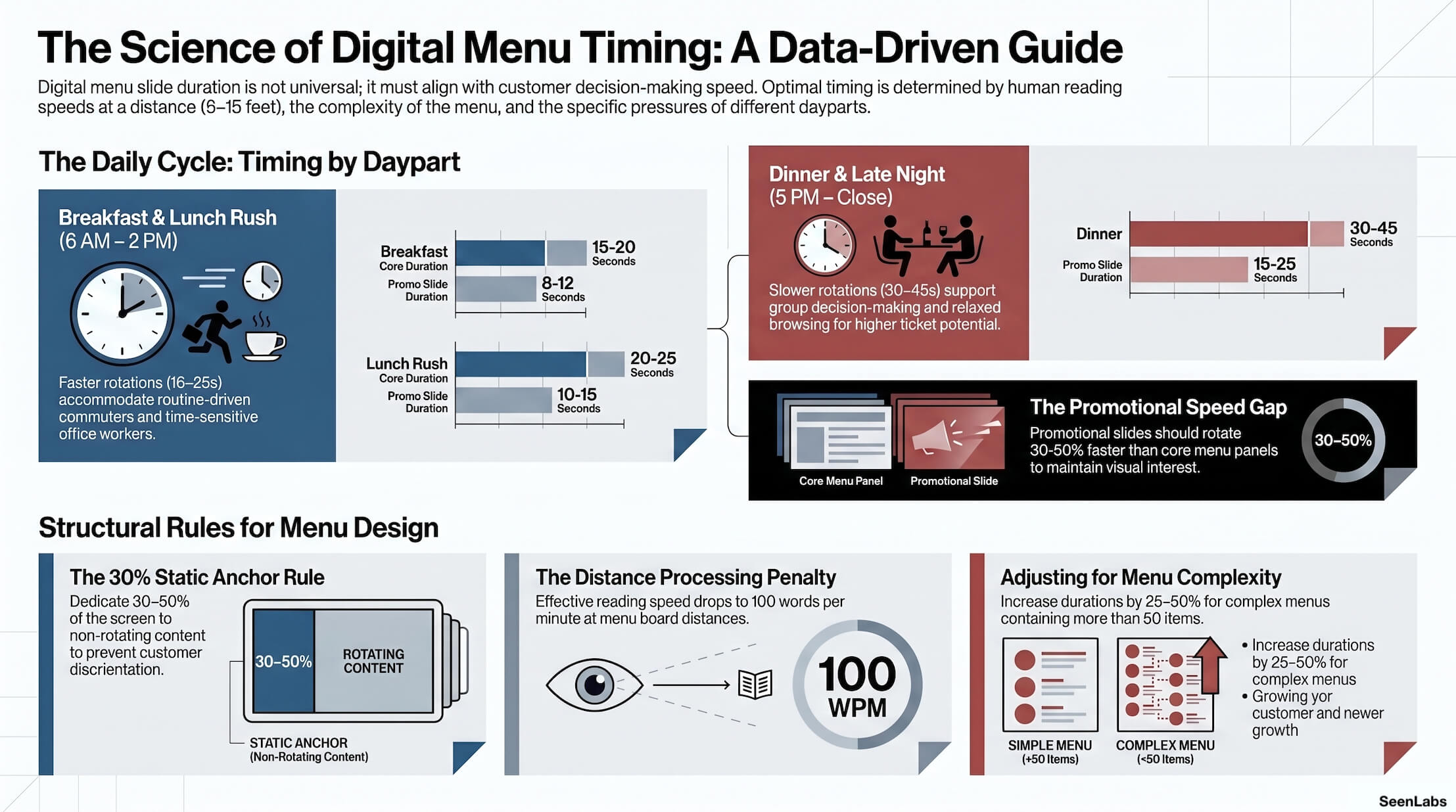
Breakfast (6 AM - 10:30 AM)
Customer Profile:
- Commuters with tight schedules
- Routine-driven (many order the same thing daily)
- Coffee focus, limited menu exploration
- High familiarity with menu
Recommended Timing:
| Content Type |
Duration |
| Core menu panels |
15-20 seconds |
| Promotional slides |
8-12 seconds |
| Coffee/breakfast specials |
10-15 seconds |
Rationale: Breakfast customers are fast. They know what they want. Shorter rotation keeps content fresh without slowing service. The limited breakfast menu means less information to process.
Static zone priority: Coffee prices, combo deals, top 3 breakfast items.
---
Lunch Rush (11 AM - 2 PM)
Customer Profile:
- Office workers on limited break time
- Moderate familiarity (weekly or bi-weekly visitors)
- Decisive, but may explore daily specials
- Sensitive to wait time
Recommended Timing:
| Content Type |
Duration |
| Core menu panels |
20-25 seconds |
| Promotional slides |
10-15 seconds |
| LTO/specials |
15-20 seconds |
Rationale: Lunch customers balance speed with modest exploration. They'll consider a special if they can see it quickly, but won't wait through multiple cycles. Moderate timing maintains flow without rushing.
Static zone priority: Combo pricing, popular entrees, wait time estimates.
---
Afternoon (2 PM - 5 PM)
Customer Profile:
- Mixed traffic (students, early dinner, snackers)
- Less time pressure
- More exploratory behavior
- Higher proportion of new or infrequent visitors
Recommended Timing:
| Content Type |
Duration |
| Core menu panels |
25-35 seconds |
| Promotional slides |
15-20 seconds |
| Premium/specialty items |
20-30 seconds |
Rationale: Lower traffic means customers have more freedom to browse. This is an excellent window for promoting premium items, new products, and LTOs that need more explanation. Slower rotation supports discovery.
Static zone priority: Full menu visibility, specialty drinks, desserts.
---
Dinner (5 PM - 9 PM)
Customer Profile:
- Families and groups (multiple decision-makers)
- Higher ticket potential
- More indecisive (group consensus takes time)
- May include first-time visitors
Recommended Timing:
| Content Type |
Duration |
| Core menu panels |
30-45 seconds |
| Promotional slides |
15-25 seconds |
| Family meals/combos |
25-35 seconds |
Rationale: Group decisions take time. A family of four may need to view the same panel 3-4 times while discussing options. Longer rotation accommodates this without frustration.
Static zone priority: Family meal deals, customization options, desserts.
---
Late Night (9 PM - Close)
Customer Profile:
- Smaller crowds, less time pressure
- May include post-event or social dining
- More relaxed browsing
Recommended Timing:
| Content Type |
Duration |
| Core menu panels |
35-45 seconds |
| Promotional slides |
20-30 seconds |
| Late-night specials |
25-35 seconds |
Rationale: Low traffic allows for leisurely viewing. This is a good time for brand-building content and premium promotions. Customers may actually watch and enjoy hero content.
Static zone priority: Late-night menu, snacks, beverages.
Timing by Menu Complexity
Daypart isn't the only factor. How complex is your menu?
Simple Menu (Under 30 Items)
Fast-casual concepts with focused menus can rotate more quickly:
- Customers orient faster
- Less scanning required
- Decisions are simpler
Timing adjustment: Reduce all recommendations by 20-30%
Medium Menu (30-50 Items)
Standard QSR menus:
- Follow daypart recommendations as written
- Ensure category headers are always visible
- Consider zone-based rotation (categories rotate independently)
Complex Menu (50+ Items)
Full-service or multi-concept locations:
- Increase all recommendations by 25-50%
- Consider static-dominant design (minimal rotation)
- Use zones extensively to prevent information overload
General principle: More items = slower rotation or more static zones.
---
The Static Zone Exception
Some content should never rotate. These items earn permanent screen real estate:
Always-Static Candidates
- Top 5 selling items — What most customers actually order
- Price anchors — Your leading value proposition
- Category navigation — Headers that help customers orient
- Regulatory content — Calorie counts, allergen links
- Wait time/status — If displayed, must be real-time
Creating a "Home Base"
Customers need an anchor—a part of the screen that's always familiar. Without this, every rotation forces re- orientation.
Dedicate 30-50% of your screen to static content. Customers will learn where to look for what they need.
---
How to Test and Optimize
Recommendations are starting points. Your specific operation may need different timing.
Simple Testing Framework
Step 1: Baseline Measurement
- Current average order time
- Current average ticket value
- Customer feedback on menu ease
Step 2: Select Test Variables
- Choose 2-3 locations
- Deploy different timing settings
- Run for 2+ weeks per variant
Step 3: Compare Results
- Did order time change?
- Did ticket value change?
- Did customer feedback scores shift?
Step 4: Implement and Monitor
- Roll out winning approach
- Continue measuring
- Adjust seasonally
Key Metrics to Track
| Metric |
What It Tells You |
| Order time |
Is timing causing confusion? |
| Ticket value |
Are customers exploring/upselling? |
| LTO uptake |
Are promotional slides getting viewed? |
| Staff questions |
Are customers asking about visible items? |
| Customer satisfaction |
Direct feedback on menu experience |
---
Common Mistakes to Avoid
Mistake 1: One Global Setting for All Dayparts
A 25-second rotation that works well at dinner will frustrate breakfast commuters. A 12-second rotation that works at breakfast will lose dinner families.
Solution: Implement daypart-specific timing schedules.
Mistake 2: Matching Rotation to Music or Ambient Content
Some operators sync slide changes to background music beats or video content loops. This creates arbitrary timing that ignores customer needs.
Solution: Time for customers, not for aesthetics.
Mistake 3: Ignoring Queue Depth
Empty queue = customers can browse freely. 10-person line = customers need to decide before reaching counter.
Solution: Where possible, increase rotation speed when queue depth is high.
Mistake 4: Setting and Forgetting
Optimal timing changes with seasons, menu updates, and customer patterns. Last year's settings may not serve this year's business.
Solution: Review and test timing quarterly.
---
Quick Reference: Timing Cheat Sheet
| Daypart |
Core Menu |
Promo Slides |
Static Zone % |
| Breakfast |
15-20 sec |
8-12 sec |
50%+ |
| Lunch Rush |
20-25 sec |
10-15 sec |
40-50% |
| Afternoon |
25-35 sec |
15-20 sec |
35-45% |
| Dinner |
30-45 sec |
15-25 sec |
30-40% |
| Late Night |
35-45 sec |
20-30 sec |
30-40% |
Adjust based on:
- Menu complexity (+25% for 50+ items)
- Customer familiarity (-20% for very regular traffic)
- Promotional intensity (more promos = faster rotation in promo zone)
---
How SeenLabs Solves This Problem
Slide timing and scheduling are core CMS features. SeenLabs provides:
Daypart-Based Timing Rules Set different rotation speeds for breakfast, lunch, dinner, and late night—automatically. No manual schedule changes needed.
Zone-Specific Durations Run your promotional zone at 12 seconds while your menu zone stays at 30 seconds. Different content types, different timing, same screen.
Static Zone Options Designate content that never rotates—ensuring customers always have their anchor.
Location-Specific Overrides High-traffic downtown location needs faster timing than suburban store? Configure each location independently.
---
Conclusion: The Right Answer Is "It Depends"—But Now You Know On What
There's no magic number for digital menu board slide duration. But there are clear principles:
- Faster at breakfast, slower at dinner — Match customer decision speed
- Simpler menus tolerate faster rotation — Complex menus need more time or static zones
- Always maintain a static anchor — Customers need orientation points
- Test, measure, adjust — Your data beats any generic recommendation
The goal isn't finding the perfect timing. It's finding the timing that works for your customers at each moment of the day.
---
Ready to Optimize Your Slide Timing?
---
About SeenLabs
SeenLabs builds digital signage solutions for quick-service restaurants, with intelligent content scheduling that adapts to your business needs. Our platform powers menu boards across thousands of locations worldwide.