Analyzing the best restaurant kiosk design practices by comparing two industry giants—and extracting lessons for your own implementation.
Ask anyone who uses QSR kiosks regularly, and you'll hear a clear consensus: some brands get it right, some get it wrong.
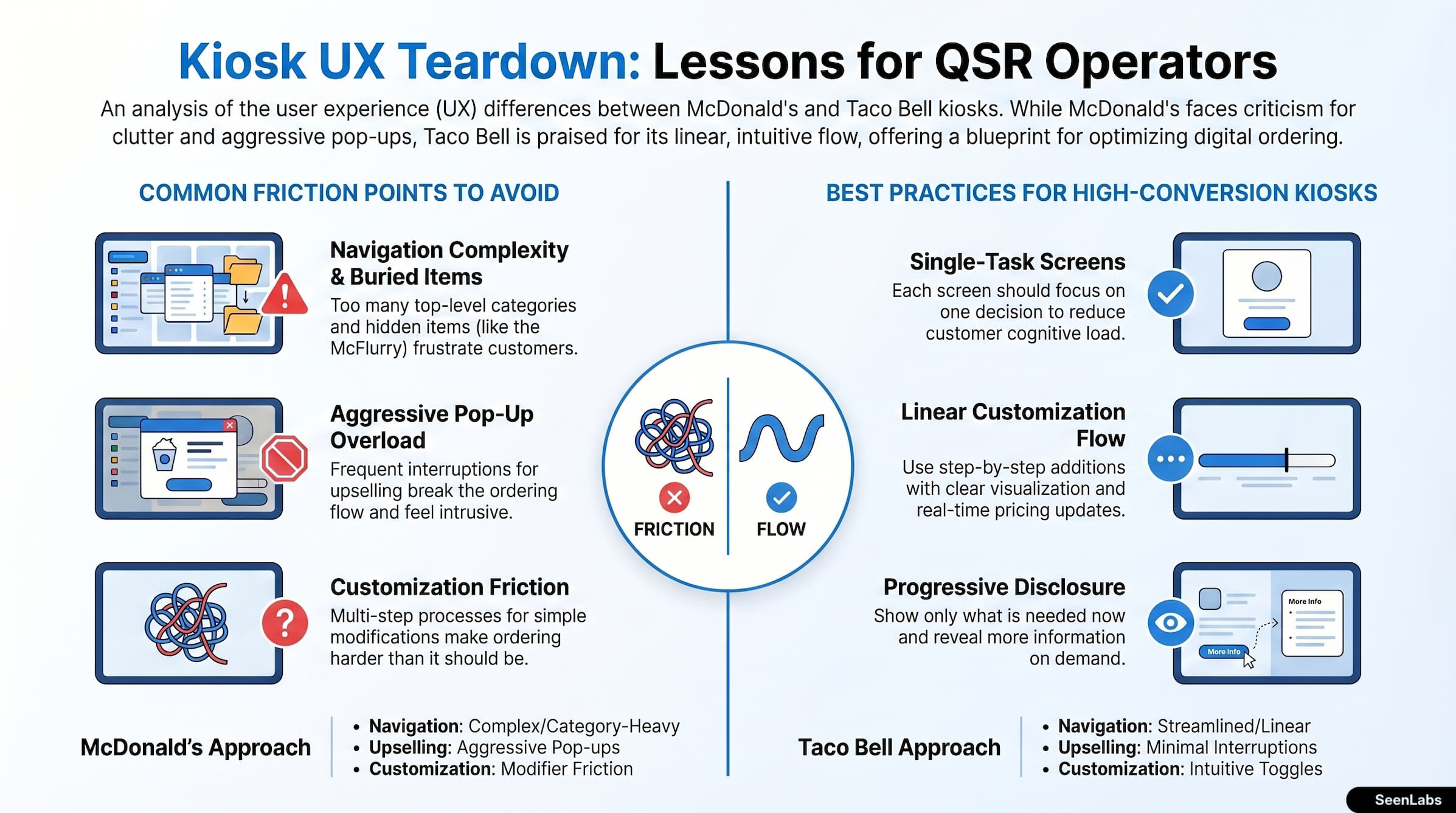
Among major chains, two names come up constantly in UX discussions. McDonald's kiosks are frequently criticized for cluttered layouts, confusing navigation, and aggressive pop-ups. Taco Bell's interface, in contrast, is often praised for intuitive customization and streamlined flow.
This article isn't about brand preference—it's about extracting UX lessons from real-world implementations. What can operators learn from the industry's largest experiments in self-order design?
Why Compare These Two?
McDonald's and Taco Bell represent different approaches to the same problem: enabling customer self-service for complex, customizable orders.
McDonald's:
- Largest global QSR brand
- Early adopter of kiosk technology
- Massive menu with regional variations
- Heavy investment in digital ordering
Taco Bell:
- Customization-heavy menu structure
- Younger, tech-comfortable customer base
- App-first strategy with in-store extension
- Known for UX innovation
Both have substantial resources and experienced design teams. Their differences reflect deliberate choices, not capability gaps.
McDonald's Kiosk Analysis
Let's examine the McDonald's kiosk experience based on consistent customer feedback themes.
What Works
Brand Recognition
- Interface feels unmistakably McDonald's
- Color scheme, typography, and imagery are consistent
- Customers know immediately where they are
Menu Comprehensiveness
- Full menu available on kiosk
- Regional and promotional items included
- Nutritional information accessible
Frequent Updates
- New products appear quickly
- Seasonal promotions are timely
- LTO items are prominently featured
What Doesn't Work
Navigation Complexity Customer feedback consistently mentions difficulty finding items:
- Too many top-level categories
- Items buried in unexpected places
- Search functionality limited or absent
- "Where's the McFlurry?" requires multiple taps
Pop-Up Overload The upselling approach is frequently criticized:
- Suggestions after nearly every item
- Multiple interruptions per transaction
- Prompts feel aggressive rather than helpful
- "No thanks" requires deliberate hunting
Visual Clutter Screens contain too much competing information:
- Promotional content competes with navigation
- Multiple items visible but none clear
- Text-heavy displays slow decision-making
- Animation distracts from task completion
Customization Friction Modifying an order is harder than it should be:
- Hidden customization options
- Multi-step processes for simple changes
- Unclear modifier selection
- Reversing changes is difficult
Payment Flow Confusion The path from order complete to payment completed isn't always clear:
- Multiple screens between "done ordering" and payment
- Loyalty prompts interrupt payment
- Receipt options add steps
Taco Bell Kiosk/App Analysis
The Taco Bell interface takes a different approach.
What Works
Linear Customization Flow Building an item feels logical:
- Base item selection
- Step-by-step additions/modifications
- Clear visualization of choices
- Easy to see what you're building
Clear Pricing Price visibility is consistent:
- Base price prominently displayed
- Modification costs shown before selection
- Running total always visible
- No surprises at checkout
Intuitive Modifiers Adding or removing items is straightforward:
- Simple toggle interface
- Visual feedback for selections
- Easy reversal of choices
- Clear indication of what's included
Memory Features The system remembers customer preferences:
- Recent orders easily reorderable
- Favorites can be saved
- Customizations persist
Speed to Checkout Fewer steps from decision to payment:
- Minimal interruptions
- One summary screen before payment
- Quick path for repeat customers
What Could Improve
Dietary Filtering While customization is easy, filtering is limited:
- No "show me vegetarian options" filter
- Allergen filtering could be more prominent
- Dietary preferences don't persist across sessions
Wait Time Estimation Expectations for order completion could be clearer:
- Wait time appears late in the process
- During high-volume periods, no warning
Loyalty Integration Rewards program flow has some friction:
- Points redemption requires multiple steps
- Free item selection isn't always clear
- Program benefits could be more prominent
Key UX Principles to Adopt
Abstracting from both examples, here are principles that drive effective kiosk design.
1. Single-Task Screens
Each screen should focus on one decision:
- "What category?" (not category + promotions + news)
- "What item?" (not item + upsells + modifiers)
- "How do you want it?" (customization only)
Why it works: Reduces cognitive load, speeds decision-making, minimizes errors.
2. Progressive Disclosure
Show only what's needed now; reveal more on demand:
- Start with broad categories
- Drill into details when requested
- Don't front-load all information
- Let curious customers explore, let decisive customers proceed
Why it works: Respects both browsing and goal-oriented customers.
3. Clear Exit Paths
At any point, users should know how to:
- Go back one step
- Start over completely
- Access their cart
- Leave the kiosk
Why it works: Reduces anxiety, encourages exploration without fear of getting stuck.
4. Consistent Placement
Navigation elements should never move:
- Cart/bag always same location
- Back button always same position
- Checkout prompt always same place
- Help option always visible
Why it works: Builds muscle memory, reduces scanning time, creates confidence.
5. Minimal Interruptions
Batch suggestions rather than interrupting:
- One comprehensive upsell screen (if any)
- One loyalty prompt (not three)
- One summary before checkout
- No pop-ups during active ordering
Why it works: Respects customer flow, reduces abandonment, maintains trust.
Translating Lessons to Your Brand
How can operators apply these insights?
Evaluate Your Current Experience
Conduct the "first-time customer test":
- Have someone unfamiliar with your menu order a moderately complex order
- Watch without intervening
- Note every hesitation, backtrack, and confusion
- Time the complete transaction
Compare your kiosk time to counter time with a skilled cashier. If the kiosk is significantly slower, UX improvements will increase adoption.
Prioritize Improvements
Not all UX issues are equal. Prioritize by:
1. Blocking issues: Customers can't complete basic tasks 2. High-friction points: Customers can complete but with significant effort 3. Annoyance factors: Experience is suboptimal but functional 4. Polish opportunities: Good could be great
Fix blocking issues first, even if expensive. They prevent all value from the kiosk investment.
Test with Real Customers
Before major changes:
- Prototype and user-test
- A/B test in limited locations
- Gather both quantitative (conversion, time) and qualitative (satisfaction, complaints) feedback
After changes:
- Monitor same metrics
- Compare to baseline
- Iterate based on results
Iterate Based on Feedback
Kiosk UX isn't "done" after launch:
- Regularly review customer complaints
- Monitor transaction patterns for drop-off points
- Compare performance across locations
- Update when menu or service model changes
The Customization Challenge
Some menus are inherently harder to present than others.
Why Complexity Matters
A burger with 3 bun options, 4 patty sizes, 8 toppings, and 6 sauces has: 3 × 4 × 2^8 × 2^6 = over 3 million possible combinations
Presenting this complexity clearly requires:
- Logical grouping of choices
- Smart defaults
- Easy modification of common combinations
- Clear pricing for each addition
Database Structure Impacts UX
How your menu is structured in database affects what's possible in interface:
- Flat list: Simple but inflexible
- Nested categories: Requires good navigation
- Modifier groups: Enables constraint logic
- Recipe components: Maximum flexibility
Operators considering kiosk UX improvements should evaluate whether current database structure limits interface options.
Building for Flexibility
Plan for menu evolution:
- LTO items should be addable without interface redesign
- Modifier groups should be expirable
- Category structure should accommodate seasonal changes
- Media (images) should be updatable without code changes
How SeenLabs Contributes
Kiosk interface design is vendor-specific software. SeenLabs contributes through:
Industry Analysis Benchmarking UX patterns across major QSR brands to identify what works and what doesn't.
Vendor Selection Guidance Helping operators evaluate kiosk solutions with informed questions about UX practices.
Integration Expertise Ensuring menu board content complements kiosk experience—consistent design language across touchpoints.
Best Practice Documentation Translating UX lessons into actionable guidelines for operators evaluating or implementing kiosk technology.
Conclusion: Borrow the Best, Avoid the Worst
No QSR chain has perfected the kiosk experience. But the best implementations share common characteristics:
- Clear navigation without clutter
- Minimal interruptions during ordering
- Easy customization with visible pricing
- Fast path from decision to checkout
- Consistent element placement
Key Takeaways
1. Single-task screens reduce cognitive load 2. Progressive disclosure respects different customer needs 3. Clear exit paths encourage exploration 4. Consistent placement builds confidence 5. Minimal interruptions maintain flow 6. Test with real customers, not assumptions 7. Iterate continuously—UX is never finished
Your kiosk doesn't need to match Taco Bell's exact approach. But it should reflect the principles that make any interface easy to use.
Ready to Improve Your Kiosk Experience?
About SeenLabs
SeenLabs builds digital signage that complements ordering experiences. We help operators create consistent, high-quality digital touchpoints across menu boards, kiosks, and mobile.