The complete guide to outdoor digital menu board brightness specifications—so your screens remain readable in any lighting condition.
Your new digital drive-thru menu looked stunning in the demo room. The colors were vibrant. The text was crisp. The videos were immersive.
Then you installed it outdoors. And by 10 AM on a sunny day, customers couldn't read a single price.
This is the brightness problem—one of the most common and costly mistakes in outdoor digital signage. Screens designed for indoor viewing become invisible in direct sunlight, rendering your technology investment useless precisely when you need it most.
This guide explains brightness specifications in plain terms and provides specific recommendations for every outdoor installation scenario.
What "Nits" Means and Why It Matters
Before diving into specifications, let's understand the measurement itself.
Nits Explained Simply
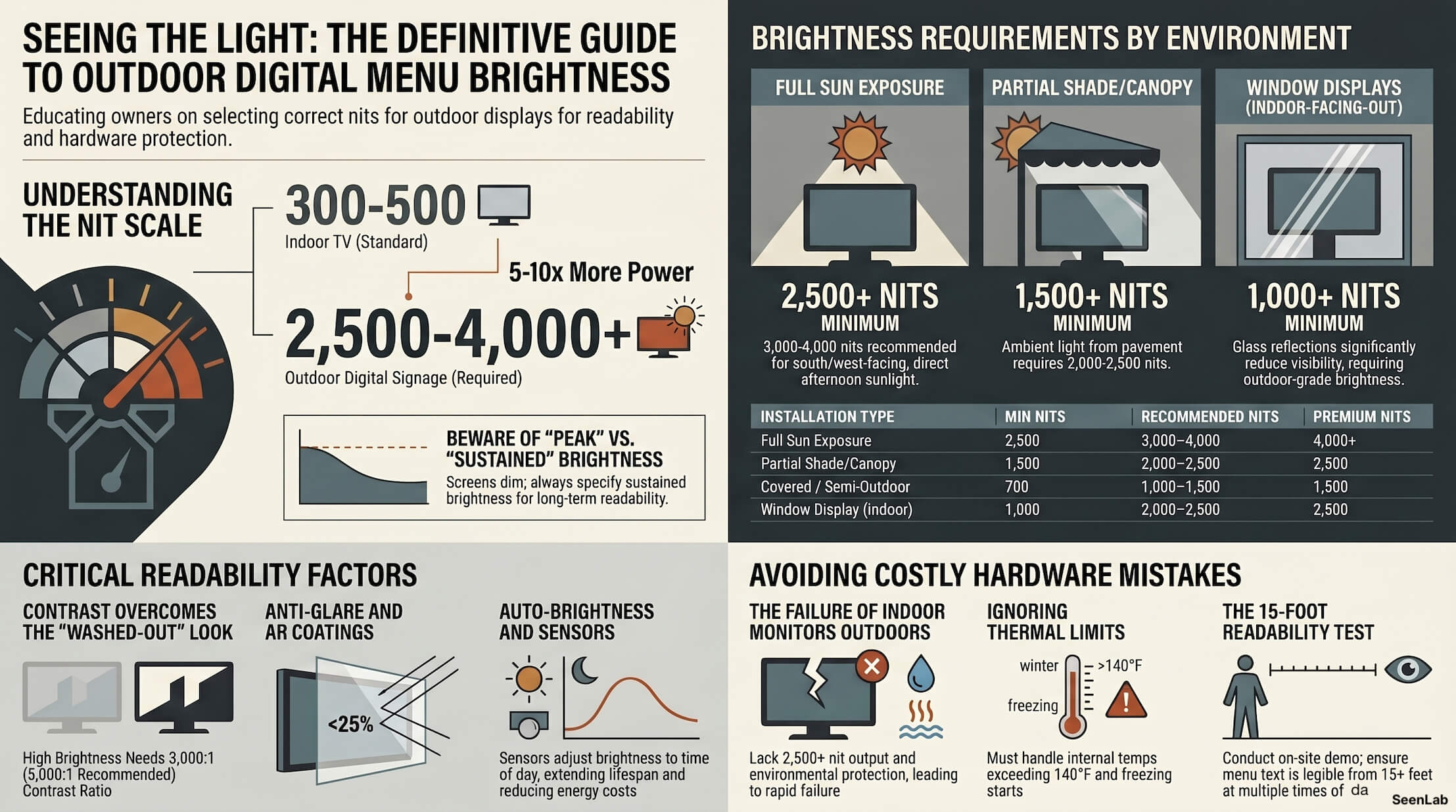
Nits (also written as cd/m², or candelas per square meter) measure how much light a display emits. Higher nits = brighter screen = better visibility in bright environments.
Think of it like a flashlight: a 100-lumen flashlight is fine in a dark room, but useless outdoors at noon. Your display works the same way.
Common Brightness Comparisons
|
Device
|
Typical Brightness
|
|
Indoor TV
|
300-500 nits
|
|
Laptop screen
|
300-400 nits
|
|
Smartphone (max)
|
800-1,200 nits
|
|
Indoor commercial display
|
500-1,000 nits
|
|
Outdoor digital signage
|
2,500-4,000+ nits
|
Notice the jump between indoor and outdoor commercial signage. Outdoor displays need 5-10x more brightness than indoor equipment.
Why Manufacturer Specs Can Mislead
Vendors sometimes advertise "high brightness" for displays that aren't truly outdoor-ready:
- "High brightness" at 700 nits (good indoors, fails outdoors)
- Brightness measured at specific angle, not viewing position
- Peak brightness vs. sustained brightness (screens dim over time)
- Marketing claims without third-party verification
Always ask for sustained brightness specifications and verify for your specific use case.
Brightness Requirements by Location
The right brightness depends on your installation environment.
Full Sun Exposure
Scenario: South-facing or west-facing installation with no shade. Direct sun hits the screen for multiple hours daily.
|
Requirement
|
Specification
|
|
Minimum brightness
|
2,500 nits
|
|
Recommended brightness
|
3,000-4,000 nits
|
|
Best for this location
|
4,000+ nits
|
Common locations: Drive-thru pre-sell boards, parking lot totems, highway-visible signage.
Note: West-facing installations often need higher brightness than south-facing due to late afternoon sun angle and customer eyes adjusting from bright sky.
Partial Shade / Canopy Coverage
Scenario: Installation under a canopy or overhang. Some direct sun at certain times, but mostly shaded.
|
Requirement
|
Specification
|
|
Minimum brightness
|
1,500 nits
|
|
Recommended brightness
|
2,000-2,500 nits
|
|
Best for this location
|
2,500 nits
|
Common locations: Drive-thru order point (under canopy), covered outdoor seating, gas station canopies.
Note: Even under canopy, ambient light from pavement and surrounding environment is significant. Don't assume shade means you can use indoor displays.
Covered / Semi-Outdoor
Scenario: Enclosed space with large openings to outside. Not climate-controlled, but not direct sun.
|
Requirement
|
Specification
|
|
Minimum brightness
|
700 nits
|
|
Recommended brightness
|
1,000-1,500 nits
|
|
Best for this location
|
1,500 nits
|
Common locations: Outdoor mall corridors, stadium concourses, open-air food courts.
Indoor with Window View
Scenario: Display inside, but visible from outside through glass (window displays).
|
Requirement
|
Specification
|
|
Minimum brightness
|
1,000 nits
|
|
Recommended brightness
|
2,000-2,500 nits
|
|
Best for this location
|
2,500 nits
|
Note: Glass reduces visibility significantly. If customers are meant to read the screen from outside, you need outdoor-grade brightness even though the display is technically indoors.
Factors Beyond Raw Brightness
Brightness matters, but it's not the only specification affecting outdoor readability.
Anti-Glare Coatings
High-brightness screens can still be hard to read if they reflect sun glare. Look for:
- Matte finish — Reduces reflections, may slightly reduce perceived sharpness
- AR (anti-reflective) coating — Reduces reflection without matte texture
- Grade: Haze value <25% for best performance
Viewing Angle Performance
Brightness specifications are typically measured straight-on. Off-angle viewing experiences brightness drop-off. For drive-thru lanes where cars approach at varying angles:
- Specify viewing angle requirements (typically 170°+ horizontal, 160°+ vertical)
- Test actual readability from the driver's perspective, not perpendicular to screen
Contrast Ratio
Brightness without contrast creates a washed-out look. Higher contrast means more distinction between darks and lights.
- Minimum: 3,000:1 contrast ratio
- Recommended: 5,000:1 or higher
In direct sun, even high-brightness displays with poor contrast can appear faded.
Auto-Brightness Adjustment
Static full brightness wastes energy at night and can create glare. Good outdoor displays include:
- Ambient light sensors — Automatically adjust brightness to environment
- Scheduling options — Set brightness by time of day
- Manual override — Adjust for specific situations
This extends display life and reduces energy costs.
Common Hardware Mistakes
These errors appear frequently in outdoor signage projects:
Mistake 1: Using Indoor Monitors Outdoors
Consumer TVs or indoor commercial displays:
- Aren't bright enough (300-500 nits vs. 2,500+ needed)
- Lack environmental protection (water, dust, temperature)
- Have shorter warranties when used outside rated conditions
- Will fail faster and cost more to replace
The fix: Always specify outdoor-rated displays for any exterior installation.
Mistake 2: Trusting Marketing Claims
"High brightness display" can mean anything. Vendors may:
- Quote peak brightness instead of sustained
- Use non-standard measurement conditions
- Omit important details about viewing angle
The fix: Request full specifications in writing. Ask for third-party verification or on-site demos.
Mistake 3: Ignoring Temperature Ratings
Outdoor displays must handle extreme temperatures:
- Summer heat (internal temps can exceed 140°F)
- Winter cold (screens may not start below certain temps)
- Rapid temperature changes (thermal stress)
Check operating temperature range and ensure it covers your location's extremes.
Mistake 4: Skipping Site Assessment
Sun angle, reflections, viewing distance, and ambient lighting all affect requirements. A site that seems "normal" may have challenging conditions:
- Reflective pavement
- Adjacent building glass
- Unusual approach angles
- Seasonal sun changes
The fix: Conduct an on-site assessment before specifying hardware.
How to Test Before You Buy
Before committing to a hardware purchase:
Request On-Site Demo
Ask vendors to bring demonstration units to your actual installation location:
- Test at multiple times of day (morning, noon, afternoon)
- View from actual customer positions (car in drive-thru, queue area)
- Check for glare and reflections from your specific environment
Any vendor unwilling to demo on-site should raise questions.
Questions to Ask Vendors
1. What is the sustained brightness (not peak)? 2. What is the operating temperature range? 3. What is the expected brightness degradation over 3 years? 4. Does the warranty cover outdoor use specifically? 5. What anti-glare treatment is included? 6. What is the measured viewing angle at 50% brightness?
Get answers in writing before purchase.
Demo Unit Checklist
When evaluating demo units:
- [ ] Can you read menu text from 15+ feet in direct sun?
- [ ] Is there visible glare from the screen surface?
- [ ] Does the screen remain visible from typical viewing angles?
- [ ] Does brightness adjust appropriately from day to night?
- [ ] Is the unit genuinely outdoor-rated (IP65+ rating)?
Total Cost Considerations
Higher brightness costs more upfront. Is it worth it?
Upfront Cost vs. Operational Success
A 2,500-nit outdoor display may cost 2-3x a 700-nit indoor display. But:
- The indoor display won't work at all in sunlight
- Customers can't order what they can't read
- Staff intervention adds labor cost
- Drive-offs add lost revenue
The calculation isn't display cost vs. display cost—it's display cost vs. functionality.
Energy Consumption
Higher brightness = higher power consumption. Consider:
- Annual electricity cost at full brightness
- Savings from auto-brightness adjustment
- Total cost of ownership over display lifespan
Typically, energy cost differences are modest compared to the cost of failed customer experiences.
Replacement Frequency
Cheaper displays fail faster outdoors:
- Indoor displays used outside may last 1-2 years
- Commercial outdoor displays typically last 5-7+ years
- Warranty coverage protects against early failures
Factor replacement cycles into your ROI calculation.
Brightness Specifications Summary
|
Installation Type
|
Min Nits
|
Recommended
|
Premium
|
|
Full sun exposure
|
2,500
|
3,000-4,000
|
4,000+
|
|
Partial shade/canopy
|
1,500
|
2,000-2,500
|
2,500
|
|
Covered semi- outdoor
|
700
|
1,000-1,500
|
1,500
|
|
Window display (indoor)
|
1,000
|
2,000-2,500
|
2,500
|
-
Additional requirements for all outdoor installations:
- IP65+ environmental rating
- Operating temperature range suitable for your location
- Viewing angle 170°+ horizontal
- Contrast ratio 3,000:1 minimum
How SeenLabs Helps
Brightness is a hardware decision, but SeenLabs supports operators through:
Hardware Compatibility Guides Validated recommendations for outdoor displays that work well with our platform—vetted for reliability and performance.
Content Optimization CMS templates designed for high-contrast outdoor readability, ensuring your content looks its best even in challenging lighting.
Site Assessment Guidance Documentation and consultation to help operators evaluate location-specific brightness requirements before hardware procurement.
Vendor Partnerships Connections to qualified commercial display providers with proven outdoor track records.
Conclusion:
Brightness Isn't Where You Cut Corners
Outdoor digital signage is a significant investment. And brightness is the specification that determines whether that investment works.
Key Takeaways
1. Outdoor requires 5-10x the brightness of indoor — Consumer displays don't work
2. Full sun needs 2,500+ nits minimum — No exceptions
3. Spec full specifications, not marketing claims — Sustained brightness, viewing angles, contrast
4. Test on-site before buying — Your location has unique challenges
5. Calculate total cost of ownership — Cheap displays cost more when they fail
A display you can't read is infinitely worse than a display you didn't buy. Get the brightness right the first time.
Ready to Specify the Right Hardware?
About SeenLabs
SeenLabs builds digital signage software that works with commercial-grade outdoor displays. We help operators select the right hardware and deploy content that's optimized for outdoor viewing conditions.