Examining the restaurant requires smartphone order challenge—when bring-your-own-device ordering excludes customers without functional phones.
---
Your phone died in the parking lot. Can you still order lunch?
At an increasing number of restaurants, the answer is: maybe not.
BYOD (Bring Your Own Device) ordering systems assume customers have smartphones, charged batteries, and functional data connections. Those without are effectively locked out. What used to be simple—walk in, order, eat—now requires personal technology that not everyone has available at every moment.
This technological gatekeeping is viewed by many customers as fundamentally inhospitable.
---
The Assumption Problem
BYOD ordering makes significant assumptions.
Smartphone Penetration Statistics
Yes, smartphone ownership is high—but not universal:
- Penetration varies significantly by age
- Ownership doesn't mean "always on person"
- Doesn't mean "always charged"
- Doesn't mean "always with data"
Aggregate statistics hide edge cases that affect real customers.
Not Everyone Has One Available
Situations where phones aren't usable:
- Forgot phone at home
- Left phone in car
- Phone is dead
- International travel (no data plan)
- Phone is broken
- Given phone to child for entertainment
These circumstances are common, not rare.
Battery, Data, Signal Realities
Even with phone in hand:
- Battery at 2% after a long day
- Data cap already exceeded
- No signal in this location
- Wi-Fi requires login
A phone in pocket doesn't guarantee ordering capability.
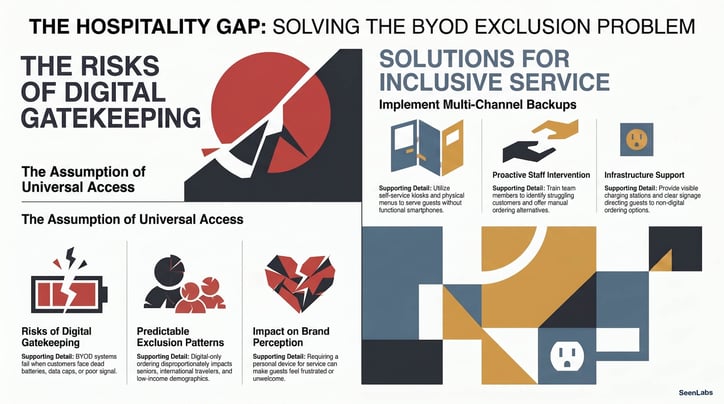
Who Gets Excluded
BYOD-only ordering creates exclusion patterns.
Elderly Customers
Many older customers:
- Don't carry smartphones
- Carry them but don't use for ordering
- Find small screens difficult
- Prefer human interaction
This demographic represents significant spending power.
International Visitors
Travelers often lack local data:
- Data roaming is expensive
- Wi-Fi may require SMS verification (catch-22)
- Foreign phone numbers create barriers
- "Tourist exclusion" affects destination restaurants
Low-Income Demographics
Smartphone access correlates with income:
- May not have smartphone at all
- May have limited data plans
- May have older phones with limited functionality
- Cannot afford to waste data on restaurant menus
BYOD excludes economically.
Anyone with a Dead Battery
The universal exclusion:
- Phones die at inconvenient moments
- Working through the day depletes battery
- Outdoor activities drain phones
- Modern life is battery-constrained
Dead battery shouldn't mean "no service."
---
The Hospitality Failure
BYOD-only undermines the hospitality mission.
Selling Tech Access, Not Food?
The implicit message:
- "Our food is for smartphone owners"
- "Your technology is your ticket to service"
- "We don't accommodate the disconnected"
This is fundamentally unwelcoming.
Customer Perception of Unwelcome
Turned away customers feel:
- Embarrassed
- Frustrated
- Unwanted
- Discriminated against
These emotions don't generate loyalty.
Premium vs. Accessible Positioning
BYOD-only creates positioning implications:
- Signals "we don't want certain customers"
- May work for tech-forward brands deliberately excluding
- Fails for brands claiming accessibility and welcome
Know what message you're sending.
---
Backup Options to Implement
Every BYOD environment needs alternatives.
Kiosks as Alternative
In-venue ordering that doesn't require personal device:
- Self-service without BYOD
- Available to all customers
- Eliminates battery and data concerns
- Familiar interface
Kiosks solve the device problem.
Staff Ordering as Fallback
Human assistance when technology fails:
- Counter always staffed
- Staff trained to take orders verbally
- No customer left without recourse
- Dignity maintained
The human option is accessibility feature.
Physical Menus on Request
Keep some physical menus available:
- "May I see a paper menu?" should always work
- Staff should offer proactively to struggling customers
- Printed menus don't need charging
Charging Stations (At Minimum)
If committed to BYOD:
- Provide charging capability
- Multiple connector types
- Visible and accessible
- Fast charging preferred
Charging doesn't solve immediate need but helps.
---
Communication Strategies
Prevent frustration through communication.
Clear Signage About Alternatives
Make backup options visible:
- "Kiosks available for ordering"
- "Staff can take your order at the counter"
- "Physical menus available on request"
Customers shouldn't have to ask.
Staff Trained to Offer Help
Proactive assistance:
- Recognize struggling customers
- Offer alternatives before frustration peaks
- Know all ordering options
- Represent hospitality, not technology
Website Disclosure Before Visit
Set expectations in advance:
- "Order via your device or at our kiosks"
- "Staff ordering always available"
- Clear before customer arrives
Pre-visit communication prevents surprises.
---
How SeenLabs Helps
BYOD failures require alternative ordering channels. SeenLabs CMS contributes through:
Menu Board Fallback Digital displays ensure menu is visible without personal phone—customers can see what's available regardless of phone status.
Multi-Channel Coordination Same content across kiosks, boards, and mobile— consistent experience regardless of access method.
Staff Assistance Signage On-screen messaging directing to human help when needed.
Charging Station Messaging Displaying phone charging locations on screens for customers who need it.
---
Conclusion: Technology Should Expand Access, Not Limit It
The purpose of technology is to serve more customers better—not to exclude customers without the right equipment.
Key Takeaways
1. BYOD assumes universal phone access — That assumption is false 2. Phone availability varies constantly — Battery, signal, data all matter 3. Exclusion patterns are predictable — Age, income, travel status 4. Hospitality requires alternatives — No customer should be unservable 5. Communication prevents frustration — Make options visible 6. Customer choice is the principle — Not technology mandates
The restaurant that ensures all customers can order—technology or no—demonstrates hospitality. The restaurant that requires technology demonstrates gatekeeping.
---
Ready to Ensure All Customers Can Order?
---
About SeenLabs
SeenLabs builds digital signage that complements—never replaces—customer choice. Our platform ensures menu visibility regardless of what technology customers bring.