The post-pandemic customer expects options.
Touch-only ordering—whether kiosks or even physical menus—creates friction for the segment of customers who specifically want to minimize contact. These customers aren't unreasonable; they're responding to years of messaging about shared surface transmission.
Restaurants that offer only touch-based interfaces alienate this segment. The technology for alternatives exists. Implementation is the question.
This article surveys touchless ordering options and their implementation considerations.
---
---
Why Touchless Matters
Understanding the demand helps prioritize solutions.
The Post-Pandemic Expectation Shift
Years of awareness about contact transmission changed behavior:
- Hand washing frequency increased
- Sanitizer use became habitual
- Awareness of shared surfaces heightened
- This awareness isn't fading quickly
Some customers will always seek lower-contact options.
The Touch-Only Limitation
If your only self-service option is touch-based:
- Hygiene-sensitive customers avoid it
- They crowd the counter instead
- Or they leave for competitors
- Your kiosk investment underperforms
Touchless options capture the otherwise-lost segment.
Customer Choice as Philosophy
Beyond hygiene-specific concern:
- Some customers simply prefer their own device
- Familiar interface, their preferences saved
- No small talk, no public screen
- Touchless = private and comfortable
Choice expands appeal.
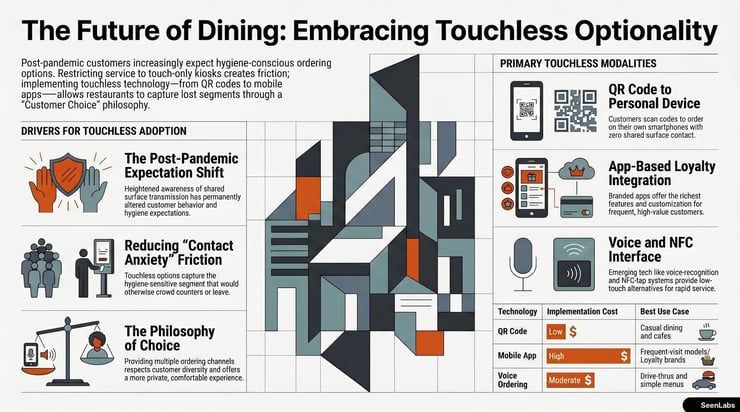
Touchless Technology Options
Several technologies enable reduced or eliminated contact.
---
Implementation Considerations
Each technology requires specific planning.
Infrastructure Requirements
QR code ordering:
- QR code display (printed or digital)
- Mobile-optimized ordering website
- Payment processing integration
- Kitchen ticket generation
NFC systems:
- NFC-enabled kiosk hardware
- Session management software
- Device compatibility testing
Voice ordering:
- Voice recognition hardware
- Acoustic environment optimization
- Natural language processing capability
- Menu data structured for voice
App ordering:
- Native app development (iOS + Android)
- Backend order management
- Push notification capability
- Ongoing maintenance and updates
POS Integration
All touchless methods require:
- Order flow into existing POS
- Payment processing coordination
- Kitchen display integration
- Receipt/confirmation generation
Integration complexity varies by POS vendor.
Staff Training
Staff need to understand:
- How each touchless method works
- How to help customers who struggle
- Where orders appear in workflow
- How to troubleshoot common issues
New technology = new training needs.
Customer Education
Customers may need guidance:
- Clear signage explaining options
- Simple instructions for each method
- Staff able to explain and demonstrate
- Grace for learning curve
First-time experience shapes future adoption.
---
Hybrid Approaches
Few environments benefit from single-option approaches.
Touch + Touchless Side by Side
Offer multiple methods simultaneously:
- Kiosks for those comfortable with touch
- QR codes for those preferring phone
- Counter for those preferring human
Customer chooses based on preference.
Fallback Options
What happens when primary fails?
- QR code doesn't work → counter backup
- Voice recognition fails → touch fallback
- App has error → web ordering alternative
Graceful degradation prevents frustration.
Customer Choice Philosophy
The goal isn't "force everyone to touchless." It's:
- Options that match customer preference
- Minimal friction for any choice
- Equal quality experience across channels
Choice respects customer diversity.
---
Measuring Touchless Adoption
Track what works for your customers.
Channel Usage Tracking
Monitor ordering method distribution:
- What percentage uses QR?
- What percentage uses kiosk?
- What percentage uses counter?
- What percentage uses app?
Trends reveal customer preference.
Customer Satisfaction by Channel
Satisfaction may vary by method:
- Survey by ordering channel
- Compare scores across methods
- Identify problem areas
High satisfaction = likely repeat use.
Optimization Based on Data
Use data to improve:
- Invest more in popular channels
- Fix problems in underperforming channels
- Consider retiring low- adoption methods
- Expand successful approaches
Data guides investment.
---
How SeenLabs Helps
Touchless ordering requires third-party ordering systems. SeenLabs CMS contributes through:
QR Code Display Integrate QR codes into menu board layouts—customers see the code, scan, and order.
Multi-Channel Content Promote touchless options on digital signage, encouraging adoption of QR and app ordering.
Integration Capability Connect with mobile ordering apps, NFC systems, and other touchless technologies.
Hybrid Layouts Display touchless alternatives alongside menu content, making options visible.
---
Conclusion: Touchless Is Expected
In a post-pandemic world, touchless options aren't a luxury—they're expected by a significant customer segment.
Key Takeaways
1. Hygiene sensitivity isn't fading — Some customers will always prefer less contact
2. Multiple technologies exist — QR, NFC, voice, app each have tradeoffs
3. Implementation requires planning — Infrastructure, integration, training
4. Hybrid approaches serve most customers — Touch + touchless together
5. Measure and optimize — Data shows what your customers actually prefer
6. Choice is the goal — Not replacing touch, but adding options
The restaurant that offers touchless options captures customers who otherwise go elsewhere. The investment in optionality pays dividends in reach.
---
Ready to Implement Touchless Ordering?
---
About SeenLabs
SeenLabs builds digital signage that supports multiple ordering channels. Our platform integrates QR codes, promotes touchless options, and helps operators offer the customer choice that drives adoption.