Thesis: The best content in the world can't fix a screen nobody sees.
Introduction
The hardware is perfect. The content is beautiful. The CMS is working flawlessly.
And nobody's looking at the screen.
This scenario plays out constantly in retail stores, restaurants, and service businesses. The problem isn't technology—it's placement.
As one industry resource notes, "Improper mounting or placement leads to safety hazards and poor visibility" (Keyser Industries). And visibility problems don't show up in spec sheets. They show up when customers walk past without a glance.
One frustrated operator described their window display on Reddit as "like a mirror" under sunlight glare—completely unreadable despite high brightness. They learned the hard way that placement problems can't be solved with better hardware.
This article covers the most common placement mistakes, provides practical guidance for screen positioning, and explains why placement should be part of the project—not an afterthought.
Where Screens Most Often Kill Their Own Effectiveness
Certain placement mistakes appear repeatedly across SMB installations.
Mounted Too High
The most common mistake: treating digital signage like a television in a sports bar.
Sports bars mount TVs high because patrons are seated, looking up over a crowd. Retail and QSR environments are different—customers are moving, distracted, and looking forward or down.
The problem: Screens mounted near the ceiling require customers to look up unnaturally. They won't.
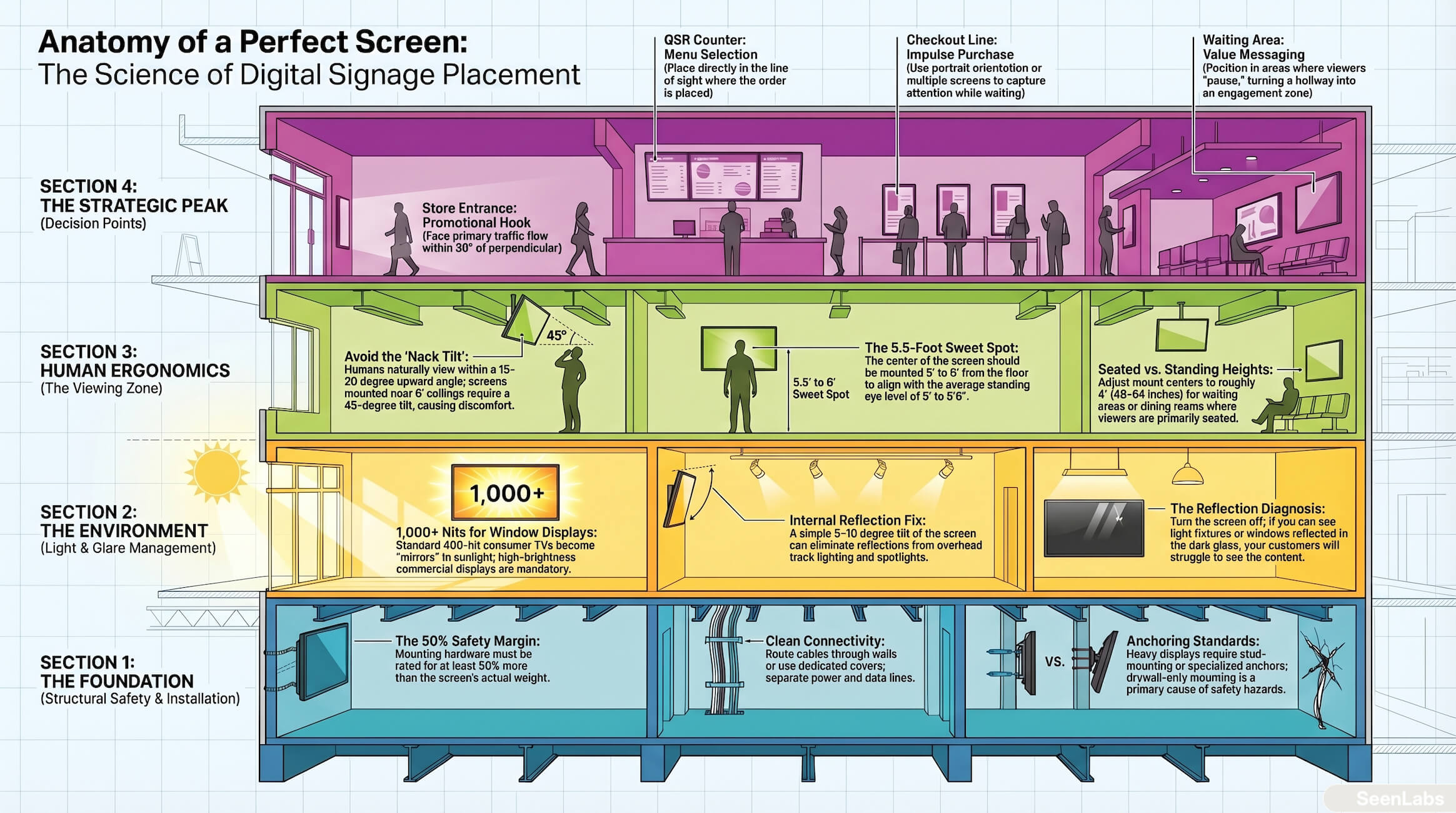
The data point: Average standing eye level is 5' to 5'6". Comfortable upward viewing angle is 15-20 degrees maximum. A screen mounted 8 feet high requires a 45+ degree neck tilt at normal viewing distance—that's discomfort, not engagement.
Best practice: Center of screen at 5' to 6' from floor for standing viewers. For seated areas, adjust based on typical seated eye height (roughly 4' for adults).
Wrong Viewing Angle
Even at correct height, angled placement reduces visibility.
Common scenarios:
- Screen mounted flat against wall, but primary traffic approaches from the side
- Screen perpendicular to flow, so viewers see only edge
- Screen tilted for "design" reasons, creating awkward viewing
Best practice: Face the screen toward primary traffic flow. If viewers approach from multiple directions, consider portrait orientation or multiple screens. If angled mounting is unavoidable, stay within 30 degrees of perpendicular to maintain readability.
Counter-Light Positioning (Glare)
Sunlight washing out screens is the most visible placement failure—literally.
Problem sources:
- Screens facing windows with afternoon sun
- Screens in window displays competing with daylight
- Reflective ambient lighting creating hot spots
The reality: A 400-nit consumer TV is invisible against direct sunlight. Even 700-nit commercial displays struggle without proper anti-glare treatment.
Solutions:
- Position screens away from direct light sources
- Use high-brightness (1000+ nit) displays for window-facing applications
- Apply anti-glare treatments or adjust screen angle to redirect reflections
- Consider enclosures with hoods for outdoor or semi-outdoor applications
Common Installation Failures
Beyond basic positioning, installation quality directly impacts effectiveness and safety.
Glare From Internal Lighting
Not all glare comes from windows. Overhead lights, especially LED spotlights and track lighting, create reflections that wash out portions of the screen.
Diagnosis: Turn off the screen and look at it from typical viewing positions. If you see light fixtures reflected, so will your customers.
Fixes:
- Adjust screen angle (even 5-10 degrees can eliminate reflections)
- Relocate or redirect problem lights
- Use matte screen or anti-reflective films
Safety Issues From Improper Mounting
A falling screen is a lawsuit waiting to happen.
Common problems:
- Mounts rated for lighter TVs than installed
- Wall anchors inadequate for wall material (drywall anchors holding 50+ lb screens)
- No safety cables on overhead installations
- Improper weight distribution on video walls
Requirements:
- Mount rating must exceed screen weight by at least 50%
- Wall anchors appropriate for wall construction (studs for heavy displays)
- Safety cables required for overhead installations in many jurisdictions
- Professional installation for anything above 40"
Cables Visible and Exposed
Visible cables signal "temporary" or "cheap." They also create safety hazards.
Basic standards:
- Cables routed through wall where possible
- Cable covers used for surface runs
- Sufficient slack for service access, but not visible coils
- Power separate from data to avoid interference
Simple Logic for Placement Decisions
You don't need a consultant to make smart placement decisions. Follow this framework.
Eye-Level ≠ Eye-Contact
Eye-level means the screen is at the height of the viewer's eyes. Eye-contact means the viewer is actually looking.
Eye-contact requires:
- Placement in the natural sightline of viewers moving through space
- Positioning where viewers pause (checkout, waiting areas, decision points)
- Content relevant to what the viewer is thinking at that moment
A screen at perfect height behind the viewer is invisible. A screen in their path as they approach the ordering counter captures attention.
The "Decision Point" Concept
Place screens where customers make decisions:
| Location |
Decision Being Made |
Screen Opportunity |
| Behind QSR counter |
What to order |
Menu display |
| Entrance approach |
Should I go in? |
Promotional hook |
| Checkout line |
Add-on purchases? |
Impulse items, loyalty |
| Service waiting area |
Is this worth my time? |
Entertainment, value messaging |
Screens at decision points influence behavior. Screens in hallways are wallpaper.
Visibility Test Protocol
Before finalizing placement:
- Mock it first — Tape paper at proposed screen location and height
- Walk the path — Move through space as customers do, noting when you see the mock
- Sit where they sit — If there's seating, check visibility from all seats
- Time of day test — Check lighting conditions at different times
- Photo documentation — Take photos from customer viewpoints
This takes 30 minutes and prevents months of regret.
Best Practices: Test Before You Commit
The smartest operators don't guess at placement—they test.
Temporary Installation Before Final
For significant deployments:
- Borrow or rent a screen similar to planned purchase
- Mount temporarily (or use floor stand) at proposed location
- Run for 1-2 weeks with test content
- Gather feedback—ask staff and customers if they noticed
- Adjust before permanent installation
The cost of a temporary setup is fraction of fixing a permanent mistake.
Use Mockups for Stakeholder Alignment
Before drilling holes, show stakeholders what they're getting:
- Use foam board cutouts at scale
- Create photo composites showing screen in location
- Stand in position and ask "can you see this?"
Many placement disasters happen because decision-makers approved a plan they didn't visualize.
How SeenLabs Handles Placement
SeenLabs treats placement as part of the project, not an afterthought.
- Site Assessment — Before recommending hardware, we evaluate intended locations for visibility, lighting conditions, and traffic flow.
- Placement Recommendations — Based on your space, we provide specific mounting height, angle, and orientation guidance—not "mount at eye level."
- Coordinate With Installation — For managed installations, we ensure the hardware ends up where it belongs, not where it's easiest to run cables.
- Not Just Hardware Sales — We're accountable for whether the system works, which means we're accountable for placement.
Ready to Get Placement Right the First Time?
See projected signage impact and discuss your space and placement needs
Conclusion
The most common digital signage failures aren't hardware failures or content failures—they're placement failures.
Key takeaways:
- Mount at viewing height, not ceiling height — Center of screen 5'-6' from floor for standing viewers
- Face the traffic, not the wall — Viewers approach from the front, not the side
- Light is your enemy — Check for glare from windows AND internal lighting
- Test before permanent installation — A temporary mockup prevents permanent regret
- Placement = part of the project — Not an afterthought after hardware arrives
A perfectly positioned screen with average content outperforms a poorly positioned screen with perfect content. Every time.
Frequently Asked Questions
Q: Where should digital screen retail displays be placed?
A: Position digital screen retail displays at decision points: near product displays (within 3-5 feet), in checkout queues (5-6 feet mounting height), or at store entrances. Avoid high-mount placements above 7 feet—research shows declining engagement above eye level.
Q: What's the ideal mounting height for retail digital screens?
A: Mount digital signage screens with center at 60-66 inches (5-5.5 feet) for standing viewers, or 48-54 inches for seated environments. Retail settings with mixed traffic should default to 60 inches center height for maximum visibility.
Q: How do I fix glare on storefront digital displays?
A: For storefront digital displays, specify high-brightness screens (700+ nits minimum, 1,500+ nits for direct sunlight). Position displays perpendicular to primary light sources, not directly facing windows. Consider anti-glare screen protectors for unavoidable sun exposure, though these reduce brightness 10- 15%.