2025 COMPREHENSIVE ANALYSIS
Interactive Point-of-Decision Signage in U.S. In-Store Environments
From table-top tablets to touchless kiosks: how interactive displays are transforming customer experiences across QSR, banking, hospitality, fitness, and healthcare.
+20%
Avg Order Increase
76%
Shorter Wait Times
3×
Upsell Rate
90%
Patient Preference
25
Pages of Research
📋 Contents
Interactive point-of-decision signage – including digital table-top "table-tents", standalone self-service kiosks, and emerging touchless interfaces – is transforming in-store experiences across industries. These technologies put information and transactions at customers' fingertips right when decisions are made, promising faster service, higher engagement, and incremental sales.
This report examines how such interactive formats are being used in the U.S. across key verticals (QSR, banking, hospitality, fitness, healthcare), identifies UX patterns that drive success, compares interactive displays to passive screens, explores trends in touchless tech, and considers operational implications for businesses.
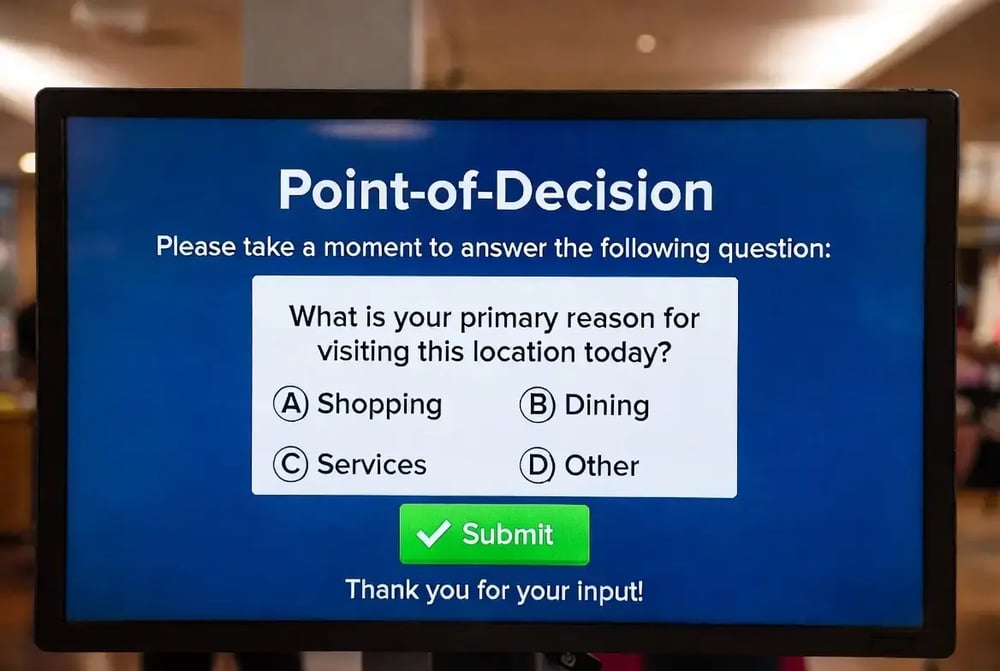
Industry Use Cases & Performance
Quick-Service Restaurants (QSR)
QSRs have widely embraced self-order kiosks in-store and drive-thru, as well as tablet-like tabletop ordering screens in fast-casual dining. These allow customers to browse menus, customize orders, and pay without waiting for a cashier. They double as digital menu boards and advertising displays to promote combos and add-ons. Some brands are piloting voice-activated ordering at drive-thrus, and a few have tested gesture-based kiosks for touch-free ordering.
76%
Shorter wait times
67%
Higher ticket sizes
69%
Improved accuracy
66%
Prefer kiosks over staff
📊 CASE STUDY: SHAKE SHACK
In-store kiosks have become the most profitable channel. Kiosk orders average "a high teens percentage" (~20%) larger than cashier orders due to effective upselling. Kiosks suggest add-ons like extra patties or bacon, leading to stronger upsell uptake.
Tabletop tablets (e.g., Ziosk at casual restaurants) have also driven upsells: Chili's observed a 20% increase in dessert sales when using table tablets that display enticing visuals. Similarly, restaurants using iPad-based table kiosks have seen 30% higher appetizer and dessert sales – likely because customers feel more comfortable ordering extras without social hesitation. Guests are 10× more likely to join loyalty programs via tablet prompts.
Retail Banking
In bank branches, interactive signage takes the form of self-service kiosks/ATMs (often with touchscreens and video assist) that handle routine transactions and product inquiries. Customers can open accounts, deposit or withdraw funds, print statements or cards, and apply for services without a teller. Some banks use large digital displays in lobbies to educate customers about loans, credit cards, and offers, effectively turning waiting areas into interactive sales points.
90%
Transactions handled by kiosks
40%
Teller cost reduction
20%
FIs with video tellers
Kiosk-driven branches can run with smaller staff; one micro-branch used kiosks plus remote tools to operate effectively with a single employee on site. Self-service kiosks indirectly boost sales by reallocating staff to relationship-building: "when tellers are freed up... they increase sales" through more cross-sell and upsell conversations. Unlike humans, machines "never forget" to make an offer.
Hospitality (Hotels & Resorts)
Hotels are rolling out self check-in kiosks in lobbies as well as promoting mobile check-in via apps/QR codes. At a kiosk, guests can scan an ID or credit card, retrieve their reservation, sign terms, get a room key encoded, and even upgrade rooms or add services. Interactive lobby screens also serve as digital concierges (for wayfinding, local info, or booking amenities).
70%
Want to skip front desk
30%
Check-in via kiosk (US)
3×
More likely to purchase upsell
+70%
Revenue per check-in
A 2025 survey found 70% of U.S. travelers would skip the front desk entirely if they could – among Gen Z it was 82%. Guests who check in via a kiosk are 3× more likely to purchase an upsell (e.g., room upgrade, breakfast package, spa access). These ancillary purchases generate about 70% more revenue per check-in than staff-handled check-ins.
Fitness & Wellness (Gyms & Studios)
In fitness centers, interactive signage appears as self-service kiosks or tablets at the front desk and throughout the facility. Common uses include member check-in (scanning an ID), signing up for classes or training sessions, and purchasing add-ons (like guest passes, merchandise, or smoothie bar orders). Many 24/7 gyms use kiosks for automated access control, allowing members to enter off-hours by verifying identity.
42%
More revenue from upselling
24/7
Unmanned access control
↓
Reduced front-desk staff
Research suggests that smart cross-selling and upselling tactics can drive up to 42% more revenue from existing members. Because the kiosk always makes the pitch (and can tailor it based on member data), it ensures no potential sale is missed – unlike a busy receptionist. Members respond well to on-screen offers when relevant to their goals; a member might more readily add a nutrition coaching package when a prompt appears and they can sign up with a few taps.
Healthcare (Hospitals & Clinics)
In healthcare settings, interactive kiosks are deployed primarily for patient self check-in and registration. These e-triage or check-in kiosks allow patients to update their info, sign forms, scan insurance cards, and explain visit reasons upon arrival at a clinic or ER. Hospitals also use digital wayfinding kiosks – interactive maps or directories that help visitors navigate large facilities.
-40%
Wait time reduction
2 min
Check-in time (vs 9-10)
99.9%
Data accuracy
90%
Prefer digital check-in
💡 KEY INSIGHT
Self-service kiosks cut the average patient check-in from ~9–10 minutes with a receptionist to under 2 minutes. Clinics saw overall wait times drop by about 40%. Digital signage makes waits feel ~35% shorter. Patients entering their own information achieve 99.9% accuracy vs. ~15% error rates with paper forms.
By reducing front desk workload ~45%, kiosks enable smaller admin teams to manage the same patient volume. 90% of patients prefer digital check-in when given the option. Interactive screens can also prompt patients: "Flu shots available today – would you like one?" to gently boost uptake of preventive services.
UX Patterns That Drive Results
Across industries, certain UX design patterns consistently lead to better engagement, higher conversion, and smoother interactions on interactive signage:
Three-Tap Flows
The primary task should be completed in ~3 taps: category → item → pay. Minimize cognitive load with large, intuitive buttons, concise prompts, ample white space, and high-contrast visual cues.
Prominent CTAs
Critical CTAs (like "Order Now" or "Pay") must be the most visible elements. Consistent placement helps users build mental models. Don't make the user hunt for the action.
Contextual Upsells
Smart add-on suggestions based on cart contents, time of day, or behavior. Feels "helpful, not intrusive". Conversion rates of 8–13% on contextual upsells significantly lift average spend.
Feedback & Confirmation
Live order summaries, progress indicators, and "review your order" screens before finalizing. Visual confirmation closes the loop and reduces errors/returns.
Accessible Design
ADA compliance: large text, color contrast, voice-assisted mode, multi-language support, and reachable touch targets. Hygiene cues ("sanitized regularly") increase trust.
Adaptive Content
Real-time updates via CMS. Auto-switch breakfast to lunch at 10:30am. Hide sold-out items. Use weather, inventory, and time triggers to alter promotions. Stale content erodes trust.
Fail-Safe & Fallback Options
Provide alternative paths: "Scan QR to continue on phone" for hesitant users. If voice fails after two attempts, enable touch or show QR code. Clear cancel/undo at every step. Obvious way to get human help. Graceful degradation keeps users confident.
Passive vs Interactive: Engagement & Recall
Interactive displays fundamentally change how customers engage compared to passive digital signage.
📊 CASE STUDY: CONTEXTUAL UPSELLING
At a taqueria, 8.2% of kiosk users added a suggested item, bumping tickets by ~$6.73 on average. At a ramen shop, 12.7% added items, making their orders 30.6% more valuable than non-kiosk orders. These concrete lifts are attributable to interactivity – the machine actively presented choices and facilitated one-click additions.
📺 Passive Display Strengths
- Broad reach and awareness
- One-to-many broadcast
- Consistent messaging
- Reaches 70% of public weekly
🖱️ Interactive Display Strengths
- One-to-one experience
- Immediate conversion on-spot
- Measurable ROI attribution
- Turns intent into action
Bottom line: Passive signage is excellent for broad reach and awareness, but interactive signage drives deeper engagement, higher conversion, and stronger recall by turning viewers into participants. Many retailers now use a mix: passive screens for branding/mood and interactive points for decision/transaction support.
Touchless Interface Trends
Interactive signage is evolving beyond touchscreens into truly touchless interfaces driven by hygiene concerns, technological advances, and changing user expectations.
Gesture Control
Mid-air hand gestures to operate kiosks without touching. Cameras track 27 hand points for fine control. Users can hover and "air tap" buttons, scroll with a wave, or pinch to zoom.
80% of consumers perceive public touchscreens as unhygienic now.
Voice-Activated
QSR kiosks allow customers to speak orders. Drive-thru screens use AI virtual order-takers that respond conversationally with upsell prompts.
8 in 10 diners believe AI voice will handle majority of food orders.
Proximity Sensors
Motion sensors detect when someone is nearby and switch from idle to engagement mode. If a sensor sees a customer picking up a product, nearby screen displays that product's info.
Context-aware signage responds to user behavior in real time.
Mobile Handoff
QR codes let users pull content to phone. Start on kiosk, finish on smartphone. Scan to pay securely without touching card reader. NFC and Bluetooth beacon integrations.
Dual-device experience combines rich display + personal input.
🎯 THE FUTURE
We're headed toward interfaces that adapt to user preference on the fly – if a user says a command, kiosk goes into voice mode; if it senses hovering hand, hints at gesture controls; if user pulls out phone, offers sync. Voice AI is now reaching 95%+ accuracy and can speed up service by ~20 seconds per order.
Operator & Staff Perspectives
Implementing interactive signage significantly impacts store operations and staff workflows. Here are key themes from operator experiences:
📚 Training & Onboarding
Assign a "kiosk ambassador" in early weeks to guide guests. Staff must understand how kiosks integrate with POS and kitchen systems. Without proper training, staff may feel threatened; with it, they become advocates.
💪 Staff Acceptance
Initial fear that kiosks will replace jobs. Once live, staff often appreciate them: kiosks handle repetitive tasks, letting employees focus on more meaningful work. Understaffed teams find relief as kiosks take over order-taking during rush.
⚙️ Workflow Changes
Queue management shifts. Kitchen display systems need tuning for bursty orders. Staff roles may be repositioned (greeter to encourage usage, runner to assist kiosk orderers). Shake Shack cut ticket times by 15 seconds with digital ordering.
🔧 Maintenance
Daily routines: cleaning screens, updating content, replacing printer paper. Need clear downtime procedures and escalation paths. Don't treat kiosks as "set-and-forget" – fresh, synchronized content is crucial.
⚠️ COMMON PITFALL
Cutting staff too quickly, leaving remaining employees to juggle both kiosk support and their old duties, leading to stress. The trend is toward finding optimal balance: use kiosks for routine/volume/consistency, and humans for empathy/complex problem-solving/relationship-building.
Staff often report higher job satisfaction after kiosks – roles evolve from "order taker" to brand ambassador or problem solver. A bank branch that installed assisted self-service kiosks ended up cross-training tellers for advisory tasks, which they found more fulfilling. Multi-location restaurants have saved ~$500/week in labor per store post-kiosk implementation.
Strategic Recommendations for Operators
Based on our analysis, we've identified key priorities for businesses deploying interactive signage. These recommendations can help maximize engagement, conversion, and ROI across your operations.
Multi-Modal Interactivity
Look for solutions with touch + voice + gesture + mobile options. "Touch-optional" approach addresses hygiene concerns. Include seamless mobile handoff via QR codes or NFC. Build robust fallback logic when one mode fails.
Smart Upsell Engine
Implement AI-driven recommendation engines that suggest products based on context, time, weather, inventory, and user data. Make it configurable. Build-in A/B testing to experiment with prompt designs and optimize conversion rates.
Streamlined UX
Follow the 3-tap rule for common tasks. Use large, intuitive CTAs with visual cues for progression. Include accessibility features (multi-language, text-to-speech, adjustable fonts). Provide "Need help?" button for stuck users.
Accessibility & Inclusivity
ADA compliance: voice guidance, multi-language support, wheelchair-accessible hardware. Consider antimicrobial screen coatings. Display cleaning/sanitization indicators. Being "most accessible" can be a competitive differentiator.
Easy CMS & Integration
Centralized content management with scheduling, remote monitoring, and instant publishing. Integrate with POS, inventory, CRM, and loyalty programs. Open APIs or pre-built integrations to popular systems make solutions more plug-and-play.
Analytics & Dashboards
Track usage patterns, conversion rates, dwell times, drop-off points. Present data in user-friendly dashboards with benchmarks. Demonstrate ROI with metrics like "kiosks upsold $X this month" or "wait time reduced by Y minutes."
🚀 Implementation Approach
Start with focused pilots – roll out to a handful of locations, gather feedback, and measure impact before scaling. Use successes as case studies (with metrics) to demonstrate value. Foster a culture of experimentation. The goal is making interactive signage a practical, results-driven capability that improves customer experience and drives measurable business outcomes.
Ready to Deploy Interactive Signage?
SeenLabs offers turnkey retail, restaurant, healthcare, and events digital signage solutions with intelligent content management.
Explore Solutions Request DemoFrequently Asked Questions
📚 Sources & References
This analysis integrates insights from industry case studies, surveys, and expert reports, including statistics on kiosk performance, UX best practices, and real-world outcomes across QSR, hospitality, healthcare, and banking sectors.
- Creative Realities: Touchless QSR Displays
- Restaurant Dive: Shake Shack Kiosks
- Restaurant Dive: McDonald's AI Voice Ordering
- Samsung Insights: Kiosk ROI
- Harvard: Ziosk Fast-Casual Experience
- imageHOLDERS: Restaurant Kiosks
- Scala: Touch Kiosks in Banking
- Financial Brand: Branch Self-Service
- Mews: Hotel Check-In Experience
- TouchWo: Patient Check-In Kiosks
- AVIXA: Kiosk UX/UI Checklist
- Medium: Kiosk Purchase Flow Design
- SoundHound: AI Voice Survey
- imageHOLDERS: Touchless Kiosks